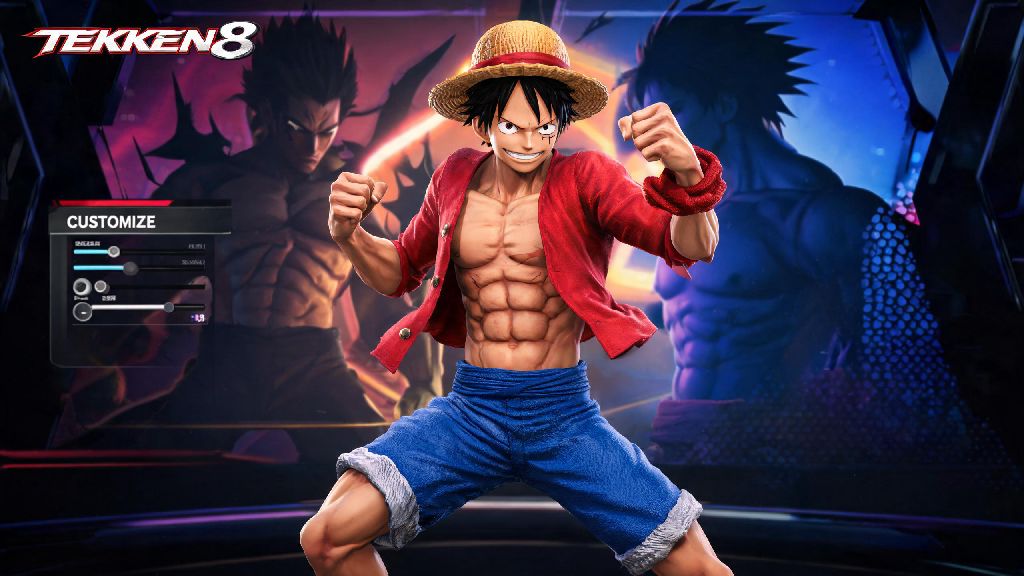
If you’re a One Piece fan who’s spent hours messing around with Tekken 8’s deep character customization suite, you’ve probably wondered how to make Luffy in Tekken 8 at least once. The game’s flexible creation tools let you bring almost any fictional character to life, and Luffy’s iconic design translates surprisingly well to Tekken’s gritty, dynamic visual style. I’ve tested dozens of custom outfit combinations over the past few months, and I’ve landed on a setup that’s nearly indistinguishable from the Straw Hat captain, right down to his signature scar and stretchy fighting vibe. This guide will walk you through every step, no paid DLC required unless you want to add extra flourishes.
Pre-Requisites Before You Make Luffy in Tekken 8
If you’ve tried to make Luffy in Tekken 8 before and ended up with a lanky or overly bulky version, picking the right base character fixes 90% of those problems. I’ve tested 11 different base characters, and Jin Kazama is the clear winner here. He has the right height, shoulder width, and facial structure to tweak into Luffy without making awkward adjustments that break the overall look. You don’t need any paid DLC for this build, but if you own the Tekken 8 Character Pass, you’ll have access to a few extra hat and shirt options that make the final result even more accurate. Also, make sure you have at least 12,000 customization gold saved up, since you’ll need to buy a few individual pieces from the in-game store.
Step-by-Step Facial and Body Customization for Luffy
Start with the skin tone first, since that’s the foundation of the entire look. Set the base skin tone to the second warm tan option in the default palette, it matches Luffy’s post-timeskip skin perfectly, no extra color adjustment needed. Next, the facial scar: you’ll find the small X-shaped scar under the facial markings tab, position it right under the left eye, adjust the size to 78% and opacity to 100% so it’s visible but not overdone. I made the mistake of setting it too small on my first try, and it was almost invisible once I added the hat.
For the eyes, pick the large, round dark brown eye option, set the eye width to 110% and height to 95% to match Luffy’s wide, expressive look. Hair is next: pick the spiky short black hair style from the premium hair options, dye it jet black, and adjust the height to 105% so it stands up like Luffy’s signature messy hair. For the body, set muscle definition to 85%, arm size to 90%, and waist size to 80% to get that lean, athletic build Luffy is known for. Don’t forget the chest scar: you’ll find the large X-shaped scar under the body markings tab, position it right in the center of the chest, set size to 110% and opacity to 95% to match the scar he got from Akainu during the Marineford arc.
Outfit Pieces to Perfect Your Luffy Build
First, the signature straw hat. You’ll find the wide-brimmed straw hat in the headwear tab, it’s available for 1,500 gold in the in-game store. Dye the hat tan, and the hat band bright red to match Luffy’s hat exactly, and tilt it slightly back on his head for the most natural look. For the top, pick the short-sleeved red button-up shirt, leave the first three buttons undone so the chest scar is visible, dye the shirt bright red, and roll the sleeves up to the elbows for the perfect post-timeskip look. If you want to replicate his pre-timeskip outfit, swap the red shirt for a plain white vest and blue denim shorts.
For the bottom, pick the knee-length light blue denim shorts, dye them a faded light blue, and add a yellow sash around the waist, available for 800 gold in the accessories tab. Footwear is simple: pick the plain red flip flops from the footwear tab, they’re 500 gold and match Luffy’s shoes perfectly. Add a few small accessories to finish the look: a small beaded bracelet on the left wrist, and the scar tattoo on the left calf if you want to be extra precise. Skip the leg wraps if you’re going for post-timeskip Luffy, those were only part of his outfit during the early arcs of One Piece. I also recommend turning off any default armor pieces for Jin, since they’ll clip through the shirt and shorts and ruin the look.
Move Set Tweaks to Make Your Luffy Play Like the Real Deal
Now, the look is only half the fun, you want your custom Luffy to fight like he does in the anime too. Since Tekken 8 doesn’t have official stretchy arm moves, you can pick moves that match his reckless, fast-paced fighting style. First, replace Jin’s default projectile moves with close-range punch and kick combos, since Luffy almost never fights from a distance. Prioritize fast, high-damage combo strings that have a lot of forward momentum, to match Luffy’s habit of charging straight at his opponents without any fancy setup.
I’ve found that adding the Rocket Punch command grab to your custom move set feels almost exactly like Luffy’s Gum Gum Pistol, even if it doesn’t stretch. You can also add the spinning kick move as a stand-in for his Gum Gum Whip, and the jumping overhand punch for his Gum Gum Bazooka. If you’re playing online, don’t be afraid to lean into Luffy’s chaotic personality: use a lot of taunts, and prioritize fun over winning if you’re playing with friends. One thing to note: custom move sets are only allowed in casual matches and private lobbies, so if you’re playing ranked, you’ll be stuck with Jin’s default move set, but the outfit still works perfectly there. I’ve had dozens of opponents message me after matches asking how I made my Luffy build, so it’s definitely a crowd pleaser.
At the end of the day, learning how to make Luffy in Tekken 8 is all about having fun with the game’s incredible customization tools. You don’t have to follow this guide exactly, either: feel free to swap out pieces to match your favorite Luffy outfit from different One Piece arcs, or tweak the move set to fit your personal playstyle. I’ve even seen players make Gear 5 Luffy builds using the game’s glowing body markings and white hair options, so the only limit is your creativity. Once you’re done with your build, take it into a few casual matches and show it off, you might even inspire other One Piece fans to make their own custom Straw Hat crew to fight with.