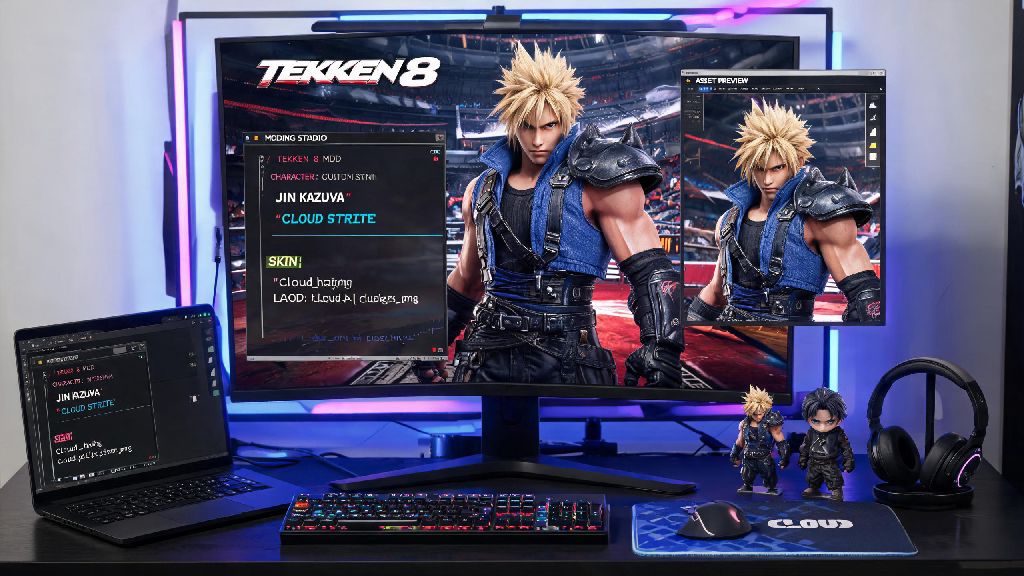
If you’ve ever scrolled through Tekken 8 clips and seen someone using a custom Cloud Strife skin for Jin, or a UI that removes all the annoying pop-up notifications, you’ve probably wondered how those creators pull those changes off. Learning how to make Tekken 8 mods is way more accessible than most players think, even if you have zero prior modding or coding experience. I started messing with fighting game mods back when Tekken 7 first launched, and I’ve broken more installs than I can count while testing tools, so I’ve put together this no-fluff guide to help you avoid the mistakes I made early on. You don’t need to be a professional graphic designer or programmer to make fun, working mods for your own use or to share with the community.
Essential Tools You Need to Download First
First, you don’t need to drop any money on premium software to build working Tekken 8 mods. All the tools the community uses are free, open-source, and regularly updated to match the latest game patches. Every tool listed is the same one the most popular creators use when they make Tekken 8 mods for wide release, so you don’t need to hunt for hidden premium tools to make high-quality content.
Make sure you download all these tools from trusted community sources, not random file download sites. Fake versions of mod unlockers often come with malware, so stick to links shared on official Tekken modding Discord servers or trusted modding hubs. Also, don’t forget to back up your original Tekken 8 save file before you start testing any mods, even if you’re using a mod manager that claims to keep your files safe. I learned this the hard way when a broken UI mod corrupted my 60-hour save file a few months back, so trust me on this one.
Core Skills You Need to Make Tekken 8 Mods (No Coding Required)
A lot of new modders give up before they even start because they assume they need to know how to code or 3D model to make anything worth using. That’s not true at all, especially for basic mods that most casual players want to make. The only skills you really need are basic image editing know-how, patience to test your mods repeatedly, and attention to detail when you’re renaming and sorting mod files. If you can resize an image, add a new layer to a texture, and follow step-by-step file naming rules, you can build a working custom skin mod in less than an hour.
For more advanced mods like custom movesets or stage edits, you will need to learn basic Unreal Engine 5 skills, but there are dozens of free community tutorials that walk you through every step of that process if you want to level up your modding later. You also don’t need a super powerful PC to build mods. I’ve made full character skins on a 5-year-old mid-tier laptop with no lag or performance issues during the editing process. The only time you’ll need more processing power is if you’re rendering custom 3D models for entirely new characters, which is a project most new modders won’t tackle for their first few builds. You can even make Tekken 8 mods that swap character voice lines or add custom music to stages once you get comfortable with the file structure, and those only require basic audio editing skills that you can pick up in an afternoon.
Step-by-Step Process to Build Your First Tekken 8 Skin Mod
Let’s walk through building a simple custom outfit color mod for Jin Kazama, since it’s the easiest first project for new modders to test. First, use UModel to extract Jin’s default outfit texture files from your Tekken 8 game folder. You’ll find these files under the Content > Characters > Jin folder in your main game directory, and you can export the texture files as PNGs to edit them in your image software of choice.
Next, open the texture file in your image editor. Make sure you don’t resize the original texture file or change its aspect ratio, because the game will fail to load the mod if the dimensions don’t match the original asset exactly. You can change the color of his jacket, add custom patterns to his pants, or even add small details like custom tattoos to his arms as long as you keep the file size and dimensions identical to the original. When you make Tekken 8 mods for personal use, you don’t have to worry about making assets that appeal to a wide audience, so feel free to get silly with your designs if that’s what you want.
Once you’re happy with your edits, export the file as a PNG with the exact same name as the original texture you extracted. Then, use the mod unlocker’s file packing tool to wrap your edited texture into a mod package that the game can read. Drag the finished mod package into your mod manager’s mod folder, enable it in the manager, and launch Tekken 8 to test if it works. If Jin loads with your custom outfit, you’ve successfully built your first mod. If the game crashes or Jin loads with a blank, gray outfit, go back and check that you named the file correctly and didn’t change the texture dimensions. Most first mod fails come from small naming errors, not issues with your actual asset edits, so don’t get discouraged if your first attempt doesn’t work right away. I went through 7 failed versions of my first custom Asuka skin before I realized I had misspelled the file name by one letter.
Common Modding Mistakes to Avoid and Troubleshooting Tips
Even experienced modders run into issues with new builds, but there are a few common mistakes you can avoid to cut down on troubleshooting time. First, never edit your core Tekken 8 game files directly. Always use a mod manager and the Unreal Engine unlocker to load custom assets separately, so you don’t break your game installation or get flagged for a ban in online play. Mods are only allowed in offline play, and using any mod that changes gameplay in online ranked matches will result in a permanent account ban, so make sure you disable all mods before you queue for online matches. That non-negotiable rule applies to all visual and gameplay mods, even if you think a custom skin won’t affect other players.
Another common mistake is downloading mods made for old patches of the game. Tekken 8 gets regular balance updates and patch drops that change file paths for character and stage assets, so a mod that worked 3 months ago may crash your game if you try to use it after a new patch drops. Always check the mod’s upload date and confirm it’s been updated for the current game version before you install it. If you run into a mod that crashes your game, the first troubleshooting step you should take is disabling all other mods except the one you’re testing, to rule out conflicts between different mod packages. Many players load 20+ mods at once and don’t realize that two different skin mods for the same character are conflicting with each other, leading to crashes or broken textures.
At the end of the day, messing around with custom mods is one of the best ways to make your Tekken 8 playthrough feel fresh, even if you’ve put hundreds of hours into the game already. You don’t need fancy skills or expensive tools to get started, and the entire modding community is incredibly welcoming to new creators who want to share their work. Now that you know how to make Tekken 8 mods, you can start small with simple skin edits and work your way up to more complex builds like custom stages or UI overhauls whenever you’re ready. Just remember to follow the community rules, back up your files, and have fun with the process. The best mods are often the silly, personal ones you make for yourself and your friends to mess around with in local play, so don’t stress about making something perfect for your first try.